What Is Multi-Axis Machining?
Multi-axis machining is any CNC configuration with more than the standard three linear axes (X, Y, Z). The common configurations are:
4-axis: three linear axes plus one rotary axis (typically A-axis: rotation about X, or B-axis: rotation about Y).
5-axis: three linear axes plus two rotary axes (typically A + C, or B + C). The two rotary axes can be on the spindle head, on the table, or a combination.
Trunnion 5-axis: 4th axis is a trunnion table rotating on a horizontal axis; 5th axis rotates the table about a vertical axis.
Head-head 5-axis: both rotary axes are on the spindle head; the workpiece remains stationary.
Head-table 5-axis: one rotary axis on the head, one on the table; the most common 5-axis configuration for complex parts.
The choice of configuration affects the workpiece size, the accessibility of features, and the cost. A head-head 5-axis machine can machine a long part with complex surfaces; a trunnion machine is best for shorter parts that need access from many angles.
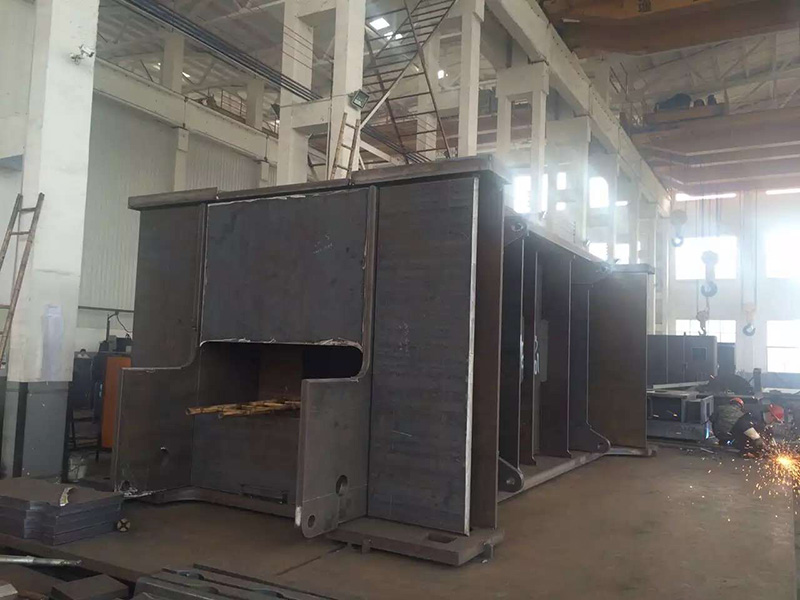
The CNC machine tool processing capability at Yuqing includes 4-axis and 5-axis configurations for parts that benefit from reduced setups.
Why Use Multi-Axis Machining?
Multi-axis machining delivers three primary benefits over 3-axis machining with manual repositioning:
Reduced setups: features on multiple faces can be machined without re-fixturing, eliminating the time and error associated with each setup change.
Improved feature access: holes, pockets, and contours on inclined surfaces can be machined with the tool normal to the surface, improving surface finish and dimensional accuracy.
Tighter tolerances: the elimination of re-fixturing error stack means that the geometric relationship between features machined in different orientations is more accurate.
For a part that requires holes on four faces, 3-axis machining needs four setups; 4-axis machining needs one or two setups; 5-axis machining can often do it in one.
The cost of multi-axis machining is higher programming time, more complex fixturing, and longer validation cycles. The economic case is justified when the multi-axis approach reduces total production time by more than the additional programming time.
When Is 3-Axis Machining Sufficient?
3-axis machining is sufficient when:
All critical features are on a single face or on parallel faces.
The part fits within the machine's work envelope in one orientation.
Tight tolerances between features are not required.
The lot size is small and the programming cost of multi-axis cannot be amortized.
For simple prismatic parts (e.g., blocks, plates, brackets), 3-axis machining is the default. The cost of moving to multi-axis (programming, validation, fixturing) is not justified.
When Is 4-Axis Machining the Right Choice?
4-axis machining is the right choice when:
Features are on multiple faces of a prismatic part (e.g., sides, top, bottom).
The part has features arranged around a central axis (e.g., a cylinder with holes on the side).
Indexed features need to be machined at multiple angular positions.
A long part can be rotated to bring features into the cutting zone without re-fixturing.
A 4-axis trunnion or rotary table allows the part to be indexed to the required angle. The cutting tool then machines the feature as it would in 3-axis. This combination of rotation + 3-axis motion handles most parts that do not require simultaneous 5-axis motion.
When Is 5-Axis Machining Necessary?
5-axis machining is necessary when:
Features are on compound angles or curved surfaces.
The tool must approach the feature from a specific angle to clear the part or to achieve a specific surface finish.
The part has sculpted features (e.g., turbine blades, impellers, complex molds).
The lot size justifies the programming investment.
Simultaneous 5-axis motion allows the tool to maintain a specific orientation relative to the surface while the machine moves along all five axes. This is essential for sculpted surfaces and for features that cannot be reached with the tool in a fixed orientation.
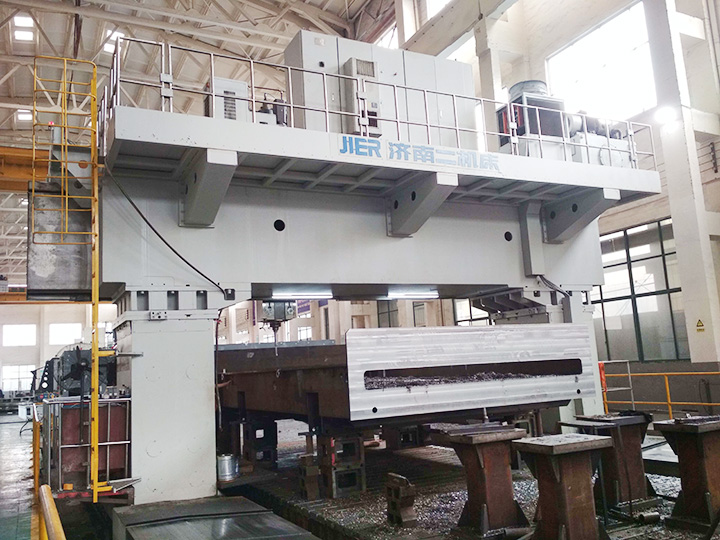
For Yuqing's floor-type boring and milling machine capability, 5-axis heads are available for large structural parts that require compound-angle machining.
What Are the Common Multi-Axis Configurations?
|
Configuration |
Workpiece Size |
Best For |
Limitations |
|
4-axis trunnion |
Small to medium |
Sides, top, bottom of prismatic parts |
Limited by trunnion size |
|
4-axis rotary table |
Small to medium |
Cylindrical parts, indexed features |
Limited by table diameter |
|
5-axis trunnion |
Small to medium |
Complex parts, multiple angles |
Trunnion size limits part size |
|
5-axis head-head |
Large |
Long parts with compound surfaces |
Higher cost, less rigid |
|
5-axis head-table |
Medium to large |
Most complex parts |
Highest cost, most flexible
|
The selection of configuration depends on the part size, the feature complexity, and the lot size. For one-off or low-volume parts, the configuration that minimizes programming time is preferred. For high-volume parts, the configuration that minimizes cycle time is preferred.
What Is the Programming Workflow for Multi-Axis?
The programming workflow for multi-axis is more complex than for 3-axis:
Part modeling: the 3D model must be accurate and complete.
Fixture design: the fixture must hold the part for all required orientations without interference with the tool.
Machine selection: the part must fit within the machine's work envelope, including the rotary axes.
Tool selection: standard tools may not reach all features; long-reach tools or specialty multi-axis tools may be needed.
Toolpath generation: CAM software generates the toolpath with collision checking against the fixture and machine.
Simulation: the toolpath is simulated in software to verify collision-free motion and material removal.
Verification on machine: the program is run dry (without material) or on a sample part to verify the actual motion.
Production: the part is machined with in-process inspection.
Each step adds time and cost. A 5-axis program for a complex part can take 10–40 hours to generate, versus 2–6 hours for a 3-axis program.
How Is Tool Orientation Managed in Multi-Axis?
Tool orientation is managed by the CAM software. The CAM programmer specifies the tool vector (direction the tool points relative to the workpiece), and the software generates the machine motion to maintain that vector.
Common tool orientation strategies:
Normal to surface: the tool points perpendicular to the surface being machined. This gives the best surface finish but requires the most complex motion.
Fixed lead/tilt: the tool points at a fixed angle relative to the surface. This is a compromise between surface finish and machine motion complexity.
Fixed orientation: the tool points in a fixed direction (e.g., always vertical). This is the simplest approach but limits the features that can be machined.
For a custom part, the choice of orientation strategy is a trade-off between surface finish, cycle time, and programming complexity. The CAM programmer typically starts with the fixed-orientation approach and progresses to normal-to-surface if the surface finish or feature access requires it.
What Are the Common Pitfalls of Multi-Axis Machining?
Common pitfalls:
|
Pitfall |
Consequence |
Prevention |
|
Collision between tool and fixture |
Machine damage, scrapped part |
Simulation, verification dry run |
|
Collision between tool and machine head |
Machine damage |
Work envelope check in CAM |
|
Tool deflection on long-reach tools |
Poor surface finish, out-of-tolerance |
Use shorter tools, reduce step-over |
|
Excessive tool wear on hard materials |
High tooling cost, scrapped parts |
Use coated tools, lower speeds |
|
Programming errors on 5-axis motion |
Scrapped parts, machine damage |
Simulation, verification, first-article inspection |
|
Inadequate workholding |
Part movement, scrapped parts |
Robust fixturing, consider vacuum or hydraulic clamps |
|
Wrong datum reference |
Inspection fails or gives wrong results |
Specify 3-2-1 datums on drawing |
Each pitfall is preventable with discipline. The first article on a new 5-axis program should be produced under close supervision, with simulation, dry-run verification, and full inspection.
How Is Multi-Axis Machining Verified?
Multi-axis machining is verified by:
Simulation: the CAM software simulates the toolpath with collision checking against the fixture, machine, and part.
Dry run: the program is run on the machine without material to verify the actual motion and to identify collisions.
First-article inspection: the first part is inspected on a CMM to verify dimensions, tolerances, and geometric relationships.
In-process inspection: critical features are measured during production to catch drift before scrap accumulates.
Final inspection: every part is inspected per the drawing requirements.
For complex multi-axis parts, the first-article inspection is the most expensive step but the most important. The CMM program must be aligned with the part datums and must measure all critical features.
How Does Multi-Axis Machining Affect Cost?
Multi-axis machining affects cost in several ways:
Machine cost: 5-axis machines are 2–5× the cost of 3-axis machines.
Programming cost: 5-axis programs take 3–10× the programming time of 3-axis programs.
Fixturing cost: fixtures for multi-axis are more complex and more expensive.
Cycle time: multi-axis often reduces cycle time by eliminating setups and reducing tool changes.
Inspection cost: multi-axis parts may require more complex CMM programs.
For low-volume or one-off parts, the programming and fixturing cost may dominate. For high-volume parts, the cycle time reduction may dominate. The economic optimum is a function of lot size, part complexity, and the cost of the multi-axis capability.
When Should a Custom Shop Use Multi-Axis?
A custom shop should use multi-axis when:
The part has features that cannot be machined in 3-axis within tolerance.
The lot size justifies the programming and fixturing investment.
The customer is willing to pay for the multi-axis capability.
The shop has the equipment, software, and skilled operators.
A custom shop should NOT use multi-axis when:
The part can be machined in 3-axis within tolerance.
The lot size is small and the programming cost cannot be amortized.
The shop does not have the equipment or skilled operators.
The customer is not willing to pay for the multi-axis capability.
Yuqing's equipment page documents the available machine configurations. Customers can confirm multi-axis capability for their specific part before quoting.
What Is the Future of Multi-Axis Machining?
Multi-axis machining is becoming more common as the cost of 5-axis machines decreases and the availability of CAM software improves. Trends include:
Lower-cost 5-axis machines: Asian and European builders are introducing 5-axis machines at price points comparable to 3-axis machines from a decade ago.
Improved CAM software: easier programming, better simulation, faster post-processing.
Hybrid additive-subtractive machines: combine additive manufacturing with multi-axis machining.
More automation: robotic loading, in-process inspection, lights-out operation.
For a custom machine shop, the trend toward more accessible multi-axis capability means that more parts will be quoted with multi-axis approaches, and more customers will expect multi-axis capability as a standard offering.
Conclusion
Multi-axis machining is a powerful capability that reduces setups, improves feature access, and tightens tolerances. The right configuration depends on the part geometry, the lot size, and the customer requirements. The programming and fixturing cost is higher than for 3-axis machining, but the cycle time reduction and the elimination of re-fixturing errors often justify the cost for complex parts. Yuqing's CNC machine tool processing and floor-type boring and milling machine capabilities include 4-axis and 5-axis configurations for parts that benefit from the approach. The equipment page documents the available configurations.
Frequently Asked Questions
What is the difference between 4-axis and 5-axis machining?
4-axis has three linear axes plus one rotary axis. 5-axis has three linear axes plus two rotary axes, allowing the tool or workpiece to be repositioned without re-fixturing in two rotational directions.
When is 5-axis machining necessary vs. nice-to-have?
5-axis is necessary when features require compound angles or simultaneous motion that cannot be achieved with 3-axis or 4-axis. It is nice-to-have when it reduces setups or cycle time but is not strictly required for geometry.
How much does 5-axis programming cost?
5-axis programming can take 10–40 hours for a complex part, depending on the geometry and the CAM software. The cost is amortized over the lot size; for high-volume production, the per-part programming cost is small.
What CAD/CAM software supports multi-axis?
Most modern CAM software supports multi-axis (Fusion 360, Mastercam, CATIA, NX, hyperMILL, etc.). The choice depends on the shop's experience and the part complexity.
Can any 3-axis machine be converted to 4-axis or 5-axis?
Some 3-axis machines can be upgraded with a 4th-axis rotary table. 5-axis upgrades are rare and expensive; most shops buy a dedicated 5-axis machine.
What is the typical tolerance achievable with multi-axis?
Multi-axis does not change the tolerance grade of the machine; it changes the geometric relationship between features by eliminating re-fixturing errors. Tolerances achievable are typically IT7–IT9, the same as the machine's capability.
How does multi-axis affect inspection?
Multi-axis parts can be inspected on a standard CMM, but the CMM program must account for the additional geometric complexity. Multi-axis parts may also require additional datum references or special fixturing for inspection.
What is the largest part that can be machined with multi-axis?
The largest part depends on the machine. A 5-axis gantry can machine parts several meters long; a 5-axis VMC is limited to about 1 cubic meter.
Is multi-axis machining always faster than 3-axis?
Not always. Multi-axis programming takes longer, and the cycle time savings depend on the part geometry. For simple parts, multi-axis can be slower. For complex parts, multi-axis is significantly faster.
How does multi-axis affect part cost?
Multi-axis typically increases the unit cost for low-volume parts due to programming and fixturing. For high-volume parts, multi-axis can reduce unit cost by reducing cycle time. The economic optimum depends on the lot size.
What industries use multi-axis machining the most?
Aerospace, medical, automotive, mold and die, and energy industries use multi-axis extensively for complex parts. Custom job shops also use multi-axis for complex custom parts.
Can multi-axis machining be combined with additive manufacturing?
Yes, hybrid additive-subtractive machines combine both processes in one setup. The trend is toward more hybrid machines for complex parts.